Superannuation funds
Superannuation funds allow you to specify the details of one or more superannuation funds to which employees belong.
 Features
- No practical limit to the number of superannuation funds that can be created
Superannuation funds form
Module: Payroll
Category: Superannuation funds
Activation: Main > Payroll > Setup > Superannuation funds
Form style: Multiple instance, SODA
Special actions available for users with Administrator permissions:
- Change the User ID of the Entered by field of memos.
- Edit memos entered by other users.
Database rules:
- A superannuation fund cannot be deleted if it is used for any employee
Field definitions
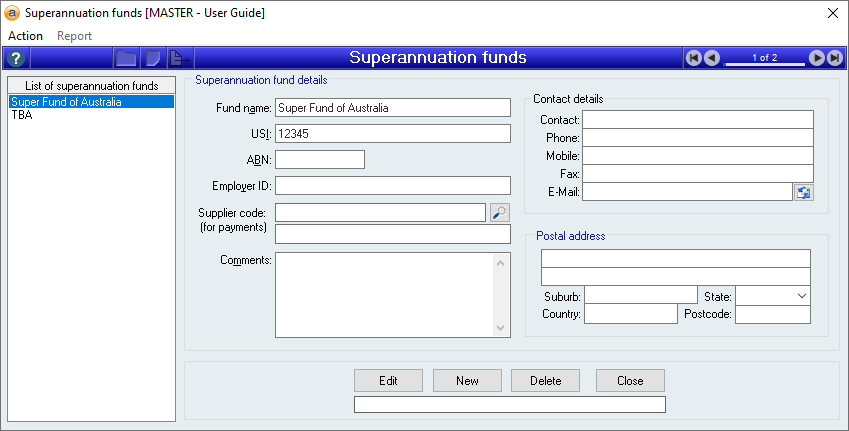
List of Superannuation funds
This list shows all superannuation funds currently defined and as you add new funds, they will appear in this list. As you click on each superannuation fund in the list, the details of the superannuation fund are displayed to the right of the list.
TIP: If you don’t know an employee’s superannuation fund, it is always a good idea to have a superannuation fund called “UNKNOWN” or “TBA” so that at least you can start allocating superannuation to that person. When you find out their correct fund, past pay runs can be changed to update to the correct fund.
Fund name
References: text(64), mandatory, FlexiCode
This is the name of the superannuation fund and is only used for internal reporting and identification. You can use whatever name you like for this, but if you have a lot of superannuation funds make sure there is consistency in naming so that you don’t accidentally duplicate a fund.
USI
Reference: Text(20)
This is the Unique Service Identifier assigned to the superannuation fund and is used by the SuperStream process to uniquely identify this superannuation fund.
Every superannuation fund, other than Self Managed Super Funds (SMSF), will have a USI. If you don’t have a superannuation fund’s USI, contact the fund and ask for it, they must be able to provide one.
If specified, the USI MUST be a valid USI number registered on the Fund Validation Service (FVS) which can be located at https://superfundlookup.gov.au/
ABN
References: Text(12)
The ABN of the selected superannuation fund. If your fund is a self managed superannuation fund, this is required to be able to identify the fund with a SuperStream Clearing House.
This field is subject to ABN validation and must represent a correct ABN (or it must be empty).
Employer ID
References: Text(20)
This is the unique ID assigned to the employer by the superannuation fund into which the superannuation payments are being paid. It is plain text and will be given to you (if it is required) by the superannuation fund. If you don’ have one or are not sure what it is, leave it empty. The superannuation fund will contact you if they require this information.
Supplier code for payments
Reference: Text(12), QuickList, AutoComplete
This is the supplier record within Accentis Enterprise to use when generating payments to the superannuation fund. While the payments that are generated are “Manual” payments, the supplier record is used to store the payment method and bank account details.
If you are using a Clearing House (single point of payment which then distributes funds to each superannuation fund), then make sure the supplier code represents the details of your Clearing House. You will have multiple superannuation funds all with the same supplier code (the Clearing House supplier) and when your superannuation payments are created, a single payment record will be created for all funds using the same supplier code.
Account name
Reference: Text(64),
This is the account name of the account to which an EFT payment is being made.
This is only used for self-managed super funds (SMSFs). Super funds that aren't SMSFs will instead use a USI number for their payments.
Last edit: 03/06/2026
Account number
Reference: Text(15),
This is the account number of the account to which an EFT payment is being made.
This is only used for self-managed super funds (SMSFs). Super funds that aren't SMSFs will instead use a USI number for their payments.
Last edit: 03/06/2026
BSB
Reference: Text(6)
This is the BSB number of the bank to which an EFT payment is being made.
This is only used for self-managed super funds (SMSFs). Super funds that aren't SMSFs will instead use a USI number for their payments.
Last edit: 03/06/2026
EFT reference text
Reference: Text(18),
This is the reference text that will appear on the bank statement of the recipient for this transaction.
This is only used for self-managed super funds (SMSFs). Super funds that aren't SMSFs will instead use a USI number for their payments.
Last edit: 03/06/2026
Electronic service address
Reference: Text(255)
An electronic service address (ESA) is a unique identifier used by self-managed super funds (SMSFs) to securely receive SuperStream data and employer contributions.
This is only used for self-managed super funds (SMSFs). Super funds that aren't SMSFs will instead use a USI number for their payments.
Last edit: 04/06/2026
Comments
References: memo, expandable
This field is used for any additional comments, text or notes that you need to store about the superannuation fund.
Contact details
References: contact
Contact details for the superannuation fund. This is for recording purposes only.
Postal address
References: address
Postal address details for the superannuation fund. This is for recording purposes only.